


The Telegraph UK Latest News
4.2145.00 Reviews
App Specs
- Version
- 5.23.1.1
- Updated On
- License
- Free
- Downloads
- 500,000+
- Developer
- Telegraph Media Group Holdings Limited
- Categories
- News & Magazines
- Platform
- Android
Screenshots


 Analysis by AppCompare
I treat a news app as a daily tool, not just a place to glance at headlines. The useful test is whether it helps me find a story, read it comfortably, and return to it when life interrupts. The Telegraph UK Latest News is built around that routine, with a focus on reporting across public affairs and other major topics. It is worth considering if you want one publication’s coverage in a dedicated app, though its approach will not suit every reader.
Where readers can get stuck
The first point to keep in mind is that a newspaper app is not the same as a broad news aggregator. Aggregators pull together coverage from many publishers; this app centers on The Telegraph. That gives the experience a clearer editorial identity, but it also means it is not the best single destination if your main goal is to compare how several outlets cover the same developing story.
Access can also feel less straightforward than simply opening a free headline feed. The app is free to download, while in-app purchases range from $1.49 to $119.99 per item. I would check the terms shown in the app before committing to anything, especially if you only want occasional reading. The key practical question is whether the articles and sections you care about are available on terms that make sense for your own reading habits.
That distinction matters in everyday use. If you read one article while waiting for a train, a paid option may not be worthwhile to you. If you return regularly for its reporting and analysis, you may judge the value differently. I would avoid assuming that downloading the app means every part of its journalism is included without further conditions.
Setup checks that save time
The app is published by Telegraph Media Group Holdings Limited and sits in the news and magazines category. It is free to install, carries an Everyone age rating, and has more than 500,000 installs. Its average rating is 4.1 from around 12,000 ratings, which gives a useful snapshot of reader response but cannot tell you whether its coverage or reading experience matches your preferences.
Before relying on it for a routine, I would check that your device meets the minimum requirement of Android 7.0 or later, then install the current version, 5.15.0.2. If a story takes a while to appear or the app behaves oddly, first check that your connection is working and that the app has finished loading. These simple checks are more useful than repeatedly tapping a headline or assuming that the article itself has disappeared.
I would also make one small habit of opening an article when you have a reliable connection if you expect to read it later. The published app description does not establish that every story will be available offline, so I would not plan a whole trip around offline access without first checking what the app actually lets you save. That is a practical distinction: a reading feature is only helpful if the particular article is available when you need it.
Worth Reading Before You Choose

Flipboard Shows What News Apps Must Do Beyond the Feed

Switching to Android Auto Means Rethinking Your Driving Routine

Google Calendar Makes a Crowded Week Easier to Manage

Ludo King Makes the Most of the Minutes Between Plans

Baby Panda World Brings Quick Play to Modern Phones, but Its Game Library Feels Busy

ESPN’s Live Game View Makes Following Close Games Easier
Using it in a real news routine
I use this section to think through a routine that makes the app easier to return to, rather than letting headlines turn into an unplanned scroll. A useful approach is to decide what I want to read during a quick check and what can wait until I have more time; that distinction helps keep a focused newspaper app practical on a busy day.
From headlines to a manageable reading list
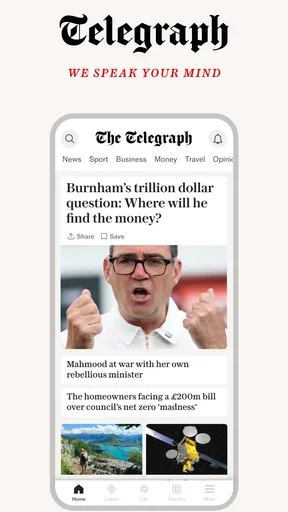
Opening the The Telegraph UK Latest News app for the first time, I was greeted by a clean, intuitive interface. There’s no unnecessary clutter, just a sleek design that makes navigation a breeze. Whether you’re a tech-savvy millennial or someone who just wants their news without any fuss, this app has you covered.
The home screen is thoughtfully organized, with breaking news headlines taking center stage. You can quickly swipe through the latest stories, and tapping on any headline opens the full article. It’s a seamless experience that keeps you engaged without overwhelming you with information.
For a more useful scan, I would avoid treating the home screen as a checklist of everything happening. Pick a few stories that matter to you, open them, and decide which deserve a full read. On a busy morning, that keeps the app from becoming another endless scroll. Later, you can come back with more time for the pieces that need context rather than trying to absorb every headline in one sitting.
Choosing what deserves your attention
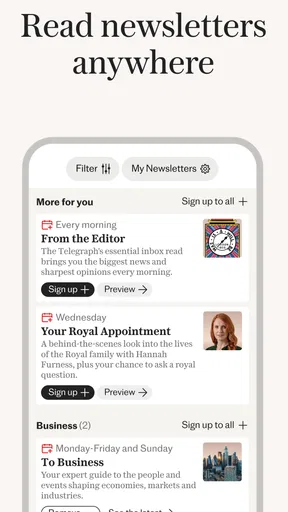
Now, let’s talk about what’s under the hood. The app offers a variety of features that cater to different reader preferences. You can customize your news feed based on interests such as politics, sports, entertainment, and more. This personalization ensures that you’re always in the loop about topics you care about.
I find that kind of selection most useful when it is treated as a filter, not a promise that the feed will contain only your chosen subjects. If I were setting it up for a week, I would begin with the sections I genuinely follow and keep the selection broad enough to catch important stories outside my usual interests. A narrowly tuned feed can feel tidy, but it may also hide a story that becomes relevant to something else I am reading.
That makes the app a better fit for someone who already knows they want The Telegraph’s take on areas such as politics, business, finance, or sport than for someone who wants a neutral-looking stream assembled across publishers. For the latter, an aggregator or a mix of news sources is a better comparison. For a reader who values returning to one publication’s coverage, a focused app can make the daily habit simpler.
Reading when the day gets interrupted
One feature that I found particularly handy is the offline reading mode. Whether you’re on a plane or in an area with spotty internet, you can save articles to read later. This is a lifesaver for those of us who love to catch up on news during downtime.
A sensible workflow is to save a story while connected, then check before travelling that it is actually available in the app. If a page will not load, I would first reopen the connection and try again rather than repeatedly saving the same item. Offline access is most helpful for planned gaps in connectivity; it is less dependable as a last-second fix when you have not prepared an article beforehand.
For example, if I have a short commute, I can use the headline scan to identify one longer piece, save it while I have a stable connection, and read it later without needing to hunt through the front page again. That is a more controlled use of the feature than downloading a pile of stories I may never get around to reading.
Making long reads more comfortable
Accessibility is clearly a priority for the developers. The app supports dark mode, which is not only easier on the eyes but also helps save battery life. The text size can be adjusted, making it accessible for users with different visual preferences.
I would try the text-size control early rather than waiting until a long article becomes tiring. A small adjustment can make reading more comfortable without changing the habit itself. Dark mode is similarly a matter of preference: it may be pleasant in a dim room, but I would switch it off if the contrast feels less clear to me. Comfort features are valuable when they match the reader, not because everyone should use them the same way.
The Telegraph UK Latest News app also supports audio versions of articles. If you’re the type who likes to listen to the news while multitasking, this feature will be your best friend. It’s like having a personal news anchor narrate the day’s events just for you.
Audio is most practical when listening will not compete with another task that needs your full attention. I would use it while doing a simple household chore or during a walk, then switch back to text for a story where I want to pause, scan details, or revisit a passage. That gives the listening option a distinct role instead of treating it as a replacement for every reading session.
Sharing and discussion without losing context
In today’s world, sharing news is just as important as reading it. The app makes it easy to share articles across various social media platforms with just a tap. Whether you want to tweet about the latest political scandal or share an inspiring story on Facebook, the app has you covered.
When I share a piece, I would include a short note about why it matters rather than sending a headline without context. That makes the link more useful to the person receiving it, particularly when a story is developing or the headline alone does not explain the point. It is also worth reading beyond the headline before sharing; a quick scan can prevent an article from being represented too simply.
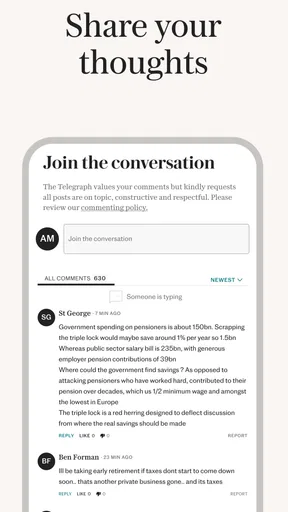
There’s also a comments section under each article, allowing you to engage with other readers. It’s a great way to see different perspectives and join in on lively discussions.
I see comments as an optional extra, not a substitute for the reporting itself. They can show how other readers are reacting, but if I want to understand a story, I start with the article and use the discussion only as another layer. If you prefer a quiet reading experience, you can simply focus on the journalism and leave the conversation alone.
When a problem may be outside the app
If a story does not load, I would separate the problem into a few basic checks: is the connection active, does another page load, and does the same article open after I return to it? A connection issue can look like an app issue, particularly when headlines are visible but the full story has not loaded. Trying again on a steadier network is a reasonable first step.
If the app feels slow, I would close and reopen it once, then check whether the device is running a supported Android version. If the issue is limited to one article, it may be a temporary loading problem rather than a reason to reset the whole app. I would avoid deleting saved material or changing several settings at once, since that makes it harder to tell what actually helped.
There is also a difference between a technical problem and an access question. If an article asks you to take an action or shows a purchase option, that is not necessarily a loading failure. Read the on-screen terms before proceeding, and decide whether the content is worth that cost to you. This is especially important if you intend to use the app casually rather than as a regular newspaper subscription.
Who will get the most from it
I would recommend trying the app if you want a direct route into The Telegraph’s coverage and like choosing a few subjects to follow rather than browsing a multi-publisher feed. The combination of a focused front page, adjustable reading presentation, and audio gives different ways to fit news into a day. The app has been available since October 2, 2013, and its current version is 5.15.0.2, so it is an established product rather than a newly launched experiment.
It is less compelling if you mainly want a free, cross-publication overview, or if you do not want to encounter in-app purchase choices. In those cases, a general news aggregator or the websites and apps of several publishers may suit you better. Neither approach is automatically superior: the trade-off is convenience and a consistent editorial source on one side, versus broader source variety on the other.
Final Thoughts
All in all, the The Telegraph UK Latest News app is a stellar choice for anyone looking to stay informed. Its user-friendly design, customizable features, and focus on accessibility make it a top contender in the world of news apps. Whether you’re a casual reader or a news junkie, this app has something for everyone.
The icing on the cake? It’s free to download, so there’s really no reason not to give it a try. Head to your app store, download it, and dive into the world of news like never before. Trust me, you won’t be disappointed.
Pros
- User-friendly interface
- easy navigation.
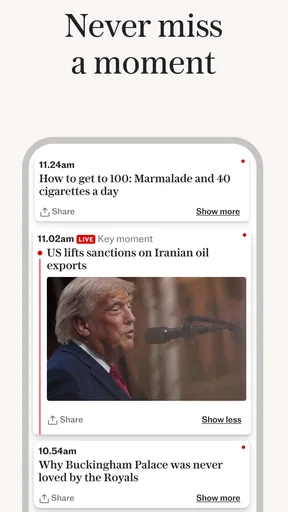
- Real-time news updates and alerts.
- Wide range of categories and topics.
- High-quality journalism and reporting.
- Offline reading mode available.
Cons
- Subscription required for full access.
- Occasional ads can be intrusive.
- Limited customization options.
- Content may be UK-centric.
- App can be data-heavy.
FAQs for The Telegraph UK Latest News
What features does The Telegraph UK Latest News app offer?
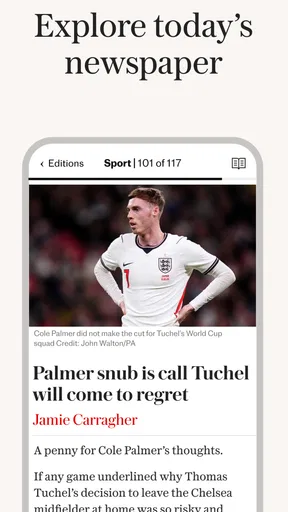
The Telegraph UK Latest News app provides users with a comprehensive news experience, featuring breaking news alerts, in-depth articles, opinion pieces, and multimedia content like videos and photo galleries. The app also offers personalized news feeds and offline reading capabilities, ensuring users can stay informed wherever they are.
Is The Telegraph app free to use?
The app itself is free to download and offers some content at no cost. However, to access premium articles and exclusive content, users may need to subscribe to The Telegraph's digital subscription service. This provides full access to all articles, daily editions, and additional features like the comment section.
How can I customize my news feed in The Telegraph app?
The Telegraph app allows users to personalize their news feed by selecting topics of interest such as politics, sports, or entertainment. Users can follow specific journalists or sections, and the app will prioritize these in the feed. This customization ensures a tailored news experience that aligns with individual preferences.
Does The Telegraph app offer offline reading?
Yes, The Telegraph app includes an offline reading feature. Users can download articles and editions to read later without an internet connection. This is particularly useful for commuters or those with limited internet access, ensuring that they remain informed even when offline.
How frequently is content updated in The Telegraph app?
Content in The Telegraph app is updated continually throughout the day, providing users with the latest news as it happens. Breaking news alerts are sent for major events, and the app includes daily editions and regular updates across all sections, ensuring a constant stream of fresh content.


